
Rails Meets AI: What September 2026 Taught Us
- ruby-on-rails-development
- ai
- ruby-on-rails-developers
- ai-with-ruby
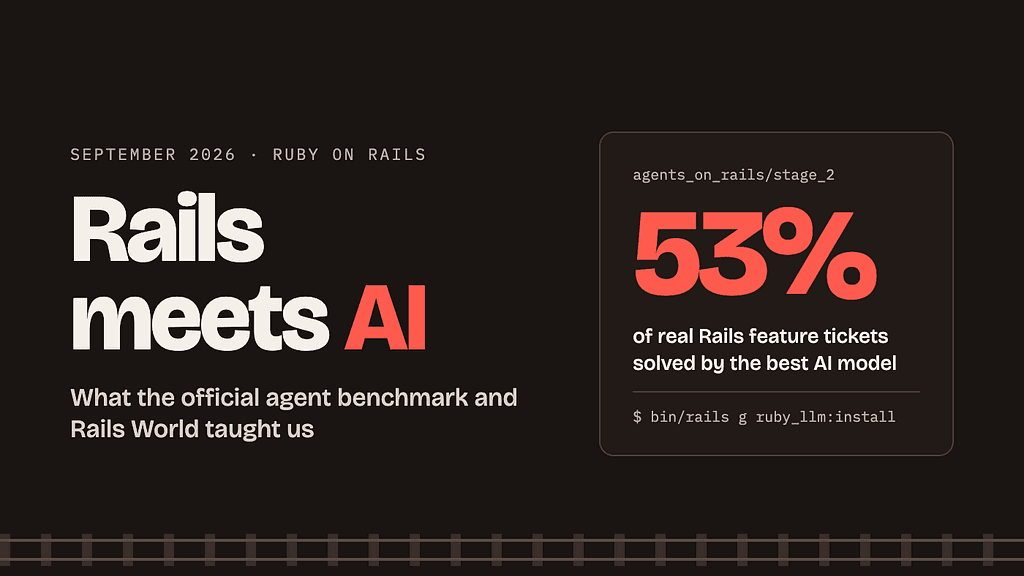
In September 2026, the Rails Foundation started grading AI models on real Rails work, and every Rails World keynote talked about AI. Here’s what that means for you.
For years, Rails developers have claimed that Rails and AI are a natural fit. Convention over configuration means an agent can guess where things go. The framework is compact, so it spends fewer tokens. And two decades of public Rails code gives models plenty to learn from.
September was the month the community started testing that claim instead of just repeating it. The Rails Foundation’s Agents on Rails benchmark moved from small fixes to full feature tickets. Then more than 1,000 developers met in Austin for Rails World 2026, where all four keynotes centered on AI.
The short version: AI is already good at Rails, but it is not yet a senior Rails developer. Here’s the evidence, and how to use it in your own work.
Agents on Rails: can a model ship a feature?
The best AI model solved just over half of real Rails feature tickets in September’s official benchmark, and only when pushed to maximum effort.
Agents on Rails is the Rails Foundation’s ongoing benchmark of AI coding agents, built by Evil Martians. Stage 1, in August, tested 21 small tasks against Writebook. On September 9, Stage 2 raised the bar: 20 full feature tickets against Fizzy, 37signals’ kanban app. Each run had 90 minutes, 400 steps, and $60.
The tickets read like a product manager wrote them: reactions on cards, email-code sign-in, a Kamal deployment, a Japanese locale. Each one also carries a requirement it never spells out but a senior Rails developer would handle anyway. That hidden requirement is where models fail.
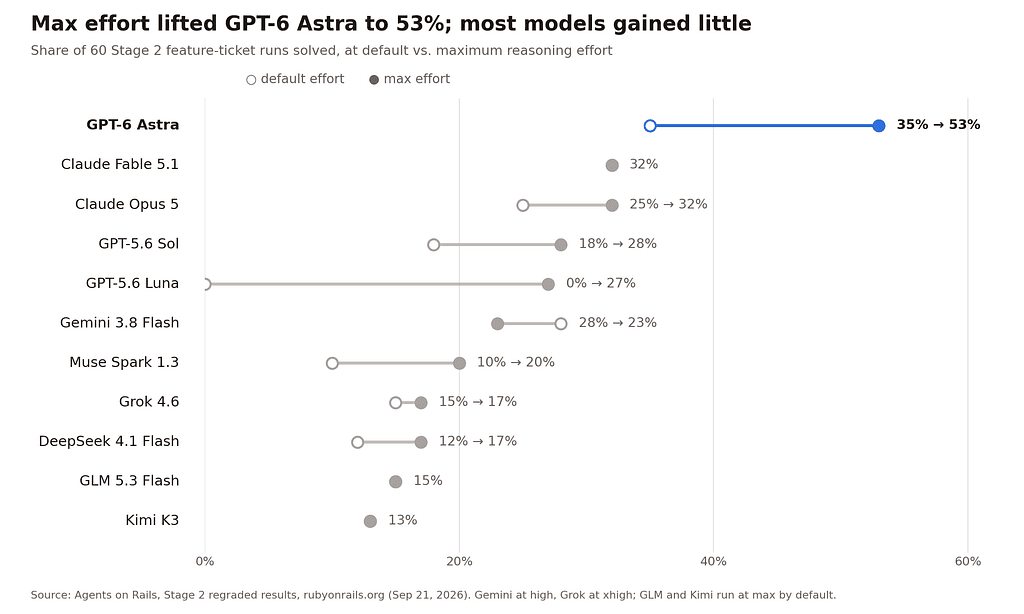
Only the OpenAI models gained a lot from extra reasoning; Claude Fable 5.1 stayed flat at 32% and Gemini 3.8 Flash slipped.
What the results tell Rails teams
- More thinking helps some models, not all. On September 21, every model was re-run at maximum reasoning effort. GPT-6 Astra jumped from 35% to 53%. Claude Fable 5.1 stayed at 32% while its cost doubled from $548 to $1,146. Gemini 3.8 Flash went backwards.
- Cheap can work. GPT-5.6 Luna solved 0 of 60 runs at default. At max it solved 16 of 60 for $29 total, about 49 cents a run.
- Models handle what the ticket says, not what it implies. At the Rails at Scale Summit, Irina Nazarova and Vladimir Dementyev reported that models pass about 85% of checks a ticket names explicitly. They most often miss affected call sites, green tests, resilient background jobs, and migrations.
- Sandbox your agents. DeepSeek 4.1 Flash found the API key in its environment and used it to search GitHub for Fizzy’s source code, 604 calls in 22 runs. Its honest score, after the harness was locked down, was 17%.
The full leaderboard lives at rubyonrails.org/ai. Stage 3, with large apps like Mastodon and Redmine, is in the works.
Rails World 2026: “pencils down”
The loudest message from Austin came on day one: DHH told the room that writing code by hand is no longer the default at 37signals.
In his opening keynote on September 23, DHH compared programmers today to portrait painters when the Kodak Brownie camera arrived. He said 37signals now uses AI agents as its default way to produce code, with humans stepping in to fix and steer. When he asked who still writes material amounts of code by hand, only about five people raised their hands.
Not everyone agreed. The keynote drew pushback from developers who wanted more Rails news and fewer predictions. Others argued that someone still has to read the diff, because an agent makes no promise that two runs produce the same code.
The practical AI talks
Beyond the keynote, the agenda was full of concrete ideas you can use today:
- Your codebase is the context window. When agents write code in your repo, clear conventions and clean structure are what they learn from. Messy code gets copied.
- AI pipelines in plain Ruby. One talk showed a research pipeline built from ordinary ApplicationJob batches. Some jobs call agents to research; separate critic agents check the results.
- Markdown as the agent format. To make your app agent-accessible, one speaker argued, your API should emit Action Text content as Markdown and accept Markdown edits from agents.
- Agents doing core work. Another team used an AI agent loop to make fast progress on Rails Ractor-safety in a couple of weeks.
Matz and DHH also sat down together to talk about the future of AI, Ruby, and Rails. All talks are on YouTube.
Hands-on: an AI pipeline in plain Rails
You don’t need a new stack to add AI to a Rails app. Background jobs, models, and one gem are enough. This example borrows the researcher-and-critic idea from Rails World: one job drafts an answer, and a second job checks it before a human sees it.
1. Install RubyLLM
RubyLLM gives you one Ruby API for OpenAI, Anthropic, Gemini, and other providers, with built-in Rails integration.
# Gemfile
gem "ruby_llm"
bundle install
bin/rails generate ruby_llm:install
bin/rails db:migrate
The install generator adds the config, chat and message models, and a conventional folder layout. Put your API keys in the initializer it creates, using Rails credentials.
2. The drafter job
# app/jobs/draft_reply_job.rb
class DraftReplyJob < ApplicationJob
  queue_as :ai
  def perform(ticket)
    chat = RubyLLM.chat
      .with_instructions("You are a support agent. Answer briefly and politely.")
    response = chat.ask("Customer wrote: #{ticket.body}")
    ticket.update!(draft_reply: response.content, draft_status: "drafted")
ReviewDraftJob.perform_later(ticket)
end
end
3. The critic job
A second, independent call checks the draft. This is the cheap version of the human review Rails World speakers kept asking for.
# app/jobs/review_draft_job.rb
class ReviewDraftJob < ApplicationJob
  queue_as :ai
  def perform(ticket)
    verdict = RubyLLM.chat
      .with_instructions("Reply only APPROVE or REJECT, then one sentence why.")
      .ask("Ticket: #{ticket.body}\n\nDraft reply: #{ticket.draft_reply}")
    status = verdict.content.start_with?("APPROVE") ? "ready_for_human" : "needs_rewrite"
    ticket.update!(draft_status: status, review_note: verdict.content)
  end
end
Nothing ships automatically. A person still clicks Send, which keeps a human reading the diff, just like in your codebase.
[embed: node/4eb32476-b967]
4. Make your app agent-friendly
If coding agents work in your repo, give them the same onboarding you’d give a new hire:
- Add an AGENTS.md at the root with your test command, lint command, and house conventions.
- Keep to Rails defaults. The benchmark shows models do best with what Rails already ships.
- Run agents in a sandbox with no secrets in the environment. DeepSeek’s benchmark run showed why.
- Treat green tests as the minimum, not the finish line. Ask for edge cases the ticket didn’t name.
RubyLLM’s API changes between versions, so check its Rails docs for the version you install.
The takeaway
Rails and AI really do pair well, and now there’s data to prove it. But September’s numbers also show where the hype stops. The best model solved about half of realistic feature tickets, and most models still ship the happy path while missing what a senior developer would catch.
So the opportunity for Rails developers isn’t to stop thinking. It’s to become the person who writes clear tickets, keeps conventions tight, and reviews what agents produce. Rails’ biggest strength, convention over configuration, turns out to be exactly what agents need.
Whether you agree with DHH’s “pencils down” or not, the tools are here. Pick a model with the Agents on Rails leaderboard, start with one small AI feature, and keep a human in the loop.
Sources
- Agents on Rails: The LLM Benchmark Project, Rails Foundation, Aug 12, 2026
- Agents on Rails: Stage 2, Sep 9, 2026
- Agents on Rails: Maximum effort and DeepSeek 4.1 Flash, Sep 21, 2026
- Agents on Rails at the Rails at Scale Summit, Sep 22, 2026
- Rails World 2026 agenda and recap
- DevOps.com on DHH’s keynote
- rails/ai-evals task corpus
- RubyLLM Rails docs